
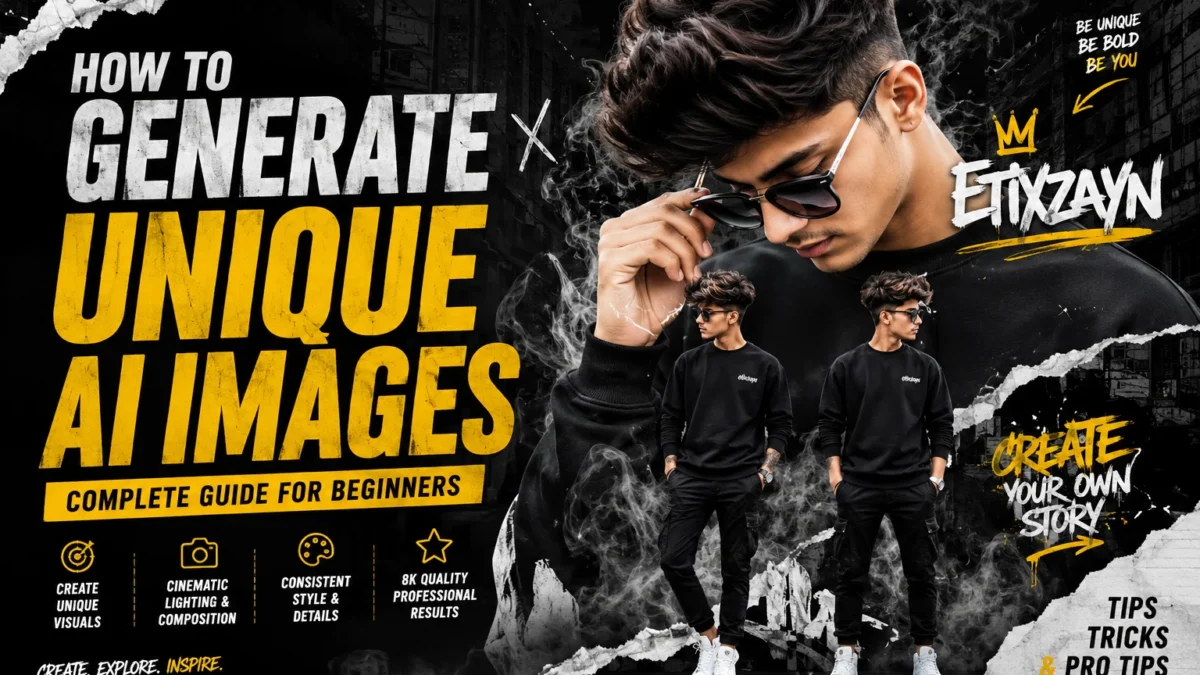
AI-generated images are everywhere. Most look identical because people reuse the same prompts, same styles, and same visual formulas. If you want your images to look unique, cinematic, and recognizable, you need to structure prompts differently.
This guide explains how to generate high-quality unique AI images with consistent style, stronger composition, and professional visual depth.
Why Most AI Images Look Generic
Most prompts fail because they are:
- Too short
- Missing visual direction
- Using overused keywords
- Not describing composition
- Ignoring lighting and texture
- Combining random styles
Example of weak prompting:
“Generate a cool guy portrait”
This gives the AI almost no creative structure.
Professional-looking AI images require detailed visual instructions.
The Core Formula for Unique AI Image Generation
A strong prompt usually contains:
- Subject
- Camera angle
- Clothing and styling
- Lighting
- Environment
- Texture and effects
- Color palette
- Composition
- Quality instructions
Step 1 — Define the Main Subject Clearly
Start by describing the person or object in detail.
Include:
- Gender
- Age range
- Hairstyle
- Expression
- Pose
- Fashion style
Example:
Young man with a modern textured hairstyle, adjusting sunglasses while looking downward
Specific details create more accurate and unique outputs.
Step 2 — Add Cinematic Composition
Composition changes everything.
Instead of:
“portrait”
Use:
- close-up portrait
- low-angle shot
- centered composition
- urban poster layout
- magazine cover framing
- cinematic crop
These instructions give structure to the image.
Step 3 — Use Layered Visual Elements
Professional AI posters often combine multiple layers.
Examples:
- torn paper textures
- smoke overlays
- graffiti typography
- neon reflections
- film grain
- shadow depth
- street textures
- motion blur
These small details make images feel handcrafted instead of AI-generated.
Step 4 — Control the Color Palette
Most generic images happen because the AI chooses random colors.
Specify:
- monochrome black and white
- dark urban tones
- warm cinematic orange
- silver metallic aesthetic
- muted streetwear palette
- cyberpunk blue glow
Consistent colors improve realism and branding.
Step 5 — Use High-End Quality Keywords Carefully
Do not spam random quality terms.
Use only relevant cinematic quality instructions like:
- 8k ultra detailed
- cinematic lighting
- hyper realistic
- sharp facial details
- ultra texture quality
- professional poster design
Too many keywords can reduce quality.
Step 6 — Add Environmental Storytelling
Good images tell a story visually.
Instead of a plain background:
- smoky city alley
- rooftop at night
- futuristic urban street
- graffiti-covered wall
- rainy neon reflections
- studio shadows with haze
Environment adds identity to the image.
Step 7 — Create Style Consistency
If you want a recognizable visual identity:
- keep the same color palette
- repeat similar lighting
- use consistent clothing style
- maintain the same composition structure
This is how creators build signature AI aesthetics.
Step 8 — Use Multi-Character Composition
Instead of generating one single pose, combine multiple versions of the same character.
For example:
- one large close-up portrait
- two smaller full-body poses
- layered poster composition
This creates a premium editorial design look.
Common Mistakes That Ruin AI Images
Overloading the Prompt
Too many unrelated styles confuse the AI.
Bad:
cyberpunk + fantasy + watercolor + realism + anime + noir
Using Only Generic Adjectives
Words like:
- cool
- awesome
- aesthetic
do not provide visual guidance.
Ignoring Lighting
Lighting is one of the most important factors.
Use:
- rim lighting
- soft cinematic lighting
- neon glow
- dramatic shadows
- studio contrast
Best AI Tools for Unique Image Generation
Popular tools include:
Each tool handles realism, typography, and composition differently.
Final Tips for Better Results
- Keep prompts visually descriptive
- Focus on composition, not random keywords
- Add environmental depth
- Use cinematic lighting
- Maintain consistent styling
- Experiment with layered poster layouts
- Refine prompts gradually instead of rewriting everything
Conclusion
Unique AI images are created through structure, visual storytelling, and composition control. The difference between generic AI art and professional-quality visuals usually comes down to prompt precision.
A well-built prompt can transform a simple portrait into a cinematic urban poster with strong identity, realistic depth, and recognizable style.