
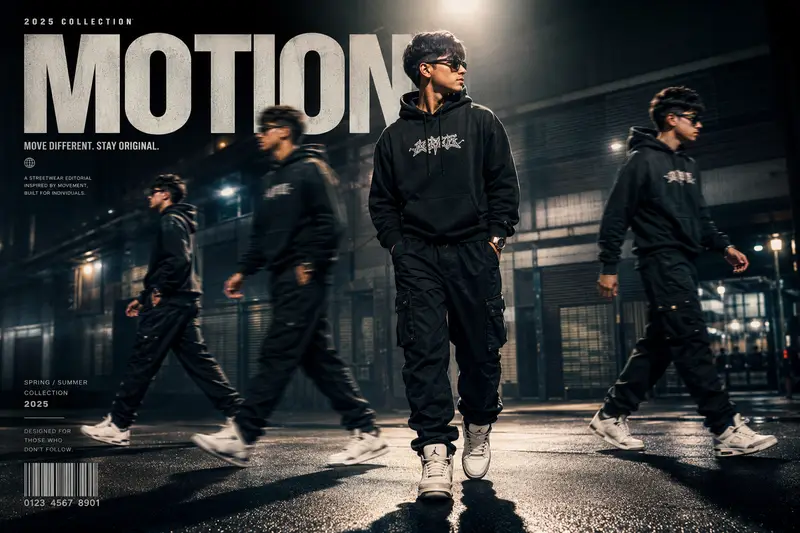
AI image generation has evolved beyond simple portraits. With the right prompt structure, you can create visuals that look like luxury fashion campaigns, streetwear magazine covers, or cinematic promotional posters — all from a single photo.
This style combines fashion photography, motion design, cinematic lighting, and editorial typography into one image. The result feels closer to a premium Nike, Off-White, or high-end streetwear campaign than a standard AI portrait.
What Makes This Style Different
Most AI portraits focus only on facial enhancement or background changes. A cinematic editorial prompt works differently.
It transforms the entire composition:
- Multiple versions of the subject appear naturally in-frame
- Motion blur creates a walking sequence effect
- Dramatic lighting adds depth and realism
- Typography turns the image into a magazine-style poster
- Cinematic color grading creates a premium atmosphere
The image becomes more than a portrait. It becomes a complete fashion campaign concept.
Key Elements of a Cinematic Streetwear Poster
Motion-Captured Clones
One of the strongest visual techniques is adding duplicate versions of the subject across the frame. These duplicates simulate movement, similar to long-exposure fashion photography or motion-capture sequences.
The central version should remain:
- Sharpest
- Largest
- Most detailed
The surrounding duplicates should appear:
- Slightly faded
- Motion blurred
- Naturally spaced
This creates energy and direction without making the image feel overcrowded.
Cinematic Lighting and Shadows
Lighting determines whether the final result looks cheap or premium.
High-end editorial aesthetics usually include:
- Overhead lighting
- Deep contrast
- Glossy highlights
- Long floor shadows
- Soft atmospheric glow
Cool-toned grading also helps create a luxury urban mood. Blue-gray cinematic tones generally work better than oversaturated colors.
Why Outfit Texture Matters
AI-generated fashion images often fail because clothing lacks texture realism.
Detailed prompts improve:
- Fabric sharpness
- Material depth
- Wrinkle realism
- Reflective surfaces
- Premium streetwear feel
Crisp outfit textures make hoodies, jackets, sneakers, and accessories appear more expensive and believable.
Typography Turns the Image Into a Campaign
Without typography, the image remains only a portrait.
Magazine-inspired text design transforms it into editorial artwork.
Popular additions include:
- Large bold headline text
- Minimal campaign subtitles
- Barcode graphics
- Collection year
- Fashion slogans
- Small technical labels
Single-word titles work especially well:
- MOTION
- STATIC
- RUSH
- ECHO
- SHIFT
- VISION
Oversized typography in empty corners helps balance composition while maintaining a luxury fashion aesthetic.
Best Photos to Use
The quality of the original photo still matters.
For best results:
- Use a clear image
- Keep full body visibility if possible
- Avoid heavy blur
- Use natural poses
- Maintain visible outfit details
Urban environments usually work best:
- Streets
- Parking garages
- Rooftops
- Industrial areas
- Night city scenes
However, strong prompts can still dramatically upgrade ordinary backgrounds.
Why This Style Performs Well on Social Media
Cinematic editorial posters perform exceptionally well because they combine:
- Fashion aesthetics
- AI creativity
- Motion illusion
- Premium branding visuals
They work effectively for:
- Instagram posts
- TikTok covers
- YouTube thumbnails
- Portfolio banners
- Personal branding
- Streetwear mock campaigns
The layered cinematic look attracts significantly more attention than standard AI portraits.
Common Mistakes
Overcrowding the Frame
Too many clones reduce realism. Four duplicates is usually enough.
Excessive Glow
Heavy glow effects remove cinematic depth. Controlled lighting works better.
Weak Typography Placement
Text should enhance composition, not cover the subject.
Unrealistic Motion Blur
Subtle motion blur appears professional. Extreme blur looks artificial.
Final Thoughts
The difference between an average AI portrait and a premium cinematic editorial image comes down to composition, lighting, motion design, and typography direction.
When these elements work together correctly, the result resembles a luxury fashion campaign rather than a typical AI-generated image.
The prompt structure you use is what controls that transformation.