
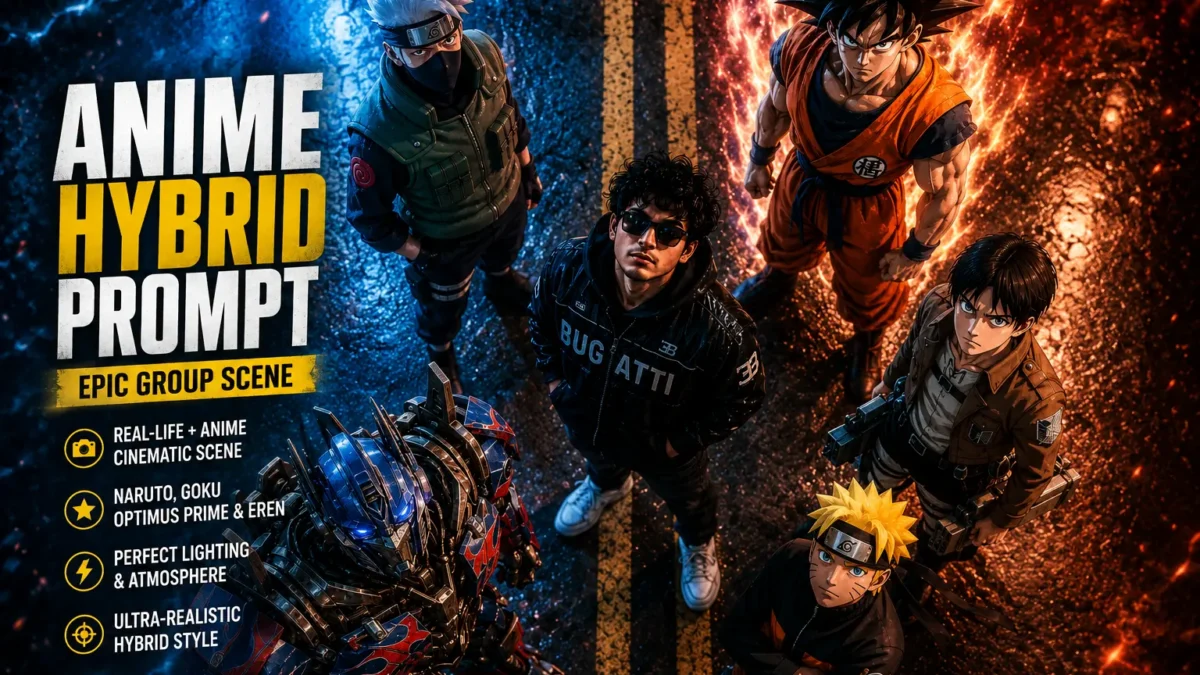
The anime hybrid ai prompt is one of the most impressive AI image generation techniques available today. This prompt transforms your photo into a cinematic group scene where you stand alongside iconic anime and fictional characters – all rendered with ultra-realistic quality that blends seamlessly between the real and animated worlds.
Whether you need a striking YouTube thumbnail, a unique profile picture, or content that sparks conversation, this prompt delivers. The hybrid approach places real photographs alongside beloved characters like Naruto, Goku, Optimus Prime, and Eren Yeager in a perfectly composed top-down scene.
Below is a comprehensive guide with a copy-paste ready version that works with both ChatGPT and Gemini.
Related: Ultra Realistic AI Sunset Prompt | Minecraft Death Screen Prompt
What Is an Anime Hybrid Prompt?
An anime hybrid prompt creates a composite image that combines real-life photography with anime or fictional characters in a single cohesive scene. The technique has exploded in popularity because it allows anyone to imagine themselves standing alongside their favorite characters from anime, video games, and movies.
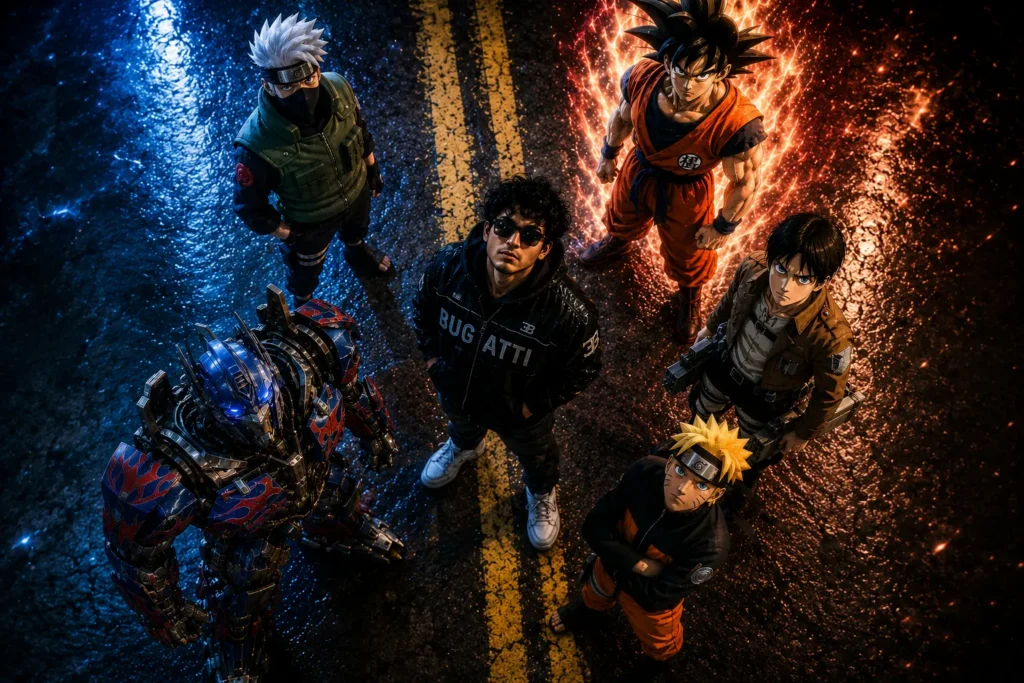
The key to a successful hybrid is maintaining the central subject exactly as they appear in your reference photo while surrounding them with characters that fit the scene naturally. The result should look like a frame from a movie or game rather than a poorly photoshopped image.
This particular prompt uses a top-down camera angle with a specific road background, yellow lines, and composition that creates a professional cinematic look. Each character is carefully positioned to maintain the group formation while looking toward the camera.
What This Prompt Creates
The prompt below is carefully crafted to generate a complete hybrid scene. Here is what each section achieves:
Camera Angle and Composition
“high top-down camera angle” – This establishes the distinctive overhead perspective that makes the scene look cinematic. The top-down angle is popular in both anime and movie productions because it allows all characters to be visible while creating dramatic composition.
Background Matching
“matching the same road background, double yellow lines, framing, and composition as the reference image” – This instruction ensures the AI uses your provided background exactly. The road with double yellow lines creates that iconic anime road scene aesthetic while maintaining realism.
Central Subject Preservation
“Keep the central real boy EXACT SAME (same face, same curly hair, same sunglasses, same Bugatti jacket, no changes at all ultra-realistic)” – This is the most critical instruction. It tells the AI to preserve EVERY detail of your reference photo – face, hair, sunglasses, jacket. The emphasis on “no changes at all” reinforces that your appearance must remain untouched.
Character Placements
The prompt places specific characters in designated positions:
- Naruto Uzumaki (bottom-right) – wearing his iconic orange-black outfit with confident expression looking upward
- Goku (top-right) – Dragon Ball Z main character in powerful stance with glowing Super Saiyan aura and cinematic lighting
- Optimus Prime (bottom-left) – Transformers leader in humanoid scale, slightly crouched for perspective, with metallic reflections
- Eren Yeager (middle-right) – Attack on Titan main character in Survey Corps outfit with intense expression looking upward
Lighting and Atmosphere
“cinematic lighting, blue aura on left side, red/orange aura on right side” – These lighting instructions create dramatic atmosphere. The dual-colored auras on opposite sides of the frame add visual interest and that signature anime power-up aesthetic.
Quality and Style
“Ultra-realistic anime hybrid style, perfect depth, shadows, reflections on road, ultra-detailed, sharp focus, slight film grain, dramatic mood, realistic blending between anime and real world” – These instructions ensure the final image looks professional. The combination of ultra-detailed rendering with slight film grain creates a cinematic look that feels like a high-budget production.
Critical Rules
“IMPORTANT RULES: DO NOT change central boy face or pose, Maintain exact composition, Keep perspective consistent (top-down), Match lighting direction and shadows, No distortion, no face changes to the real person” – These rules are explicitly stated to prevent common AI generation issues. The repetition emphasizes how important subject preservation is.
Best Uses for Anime Hybrid Images
The anime hybrid prompt has become incredibly popular across multiple platforms and use cases:
YouTube Thumbnails
Content creators use these images for thumbnails that instantly grab attention. The combination of recognizable anime characters with real people creates curiosity and clicks. The unique visual stands out in crowded YouTube feeds.
Social Media Profile Pictures
Instagram, TikTok, and X users create unique profile images that showcase their personality. Standing alongside Naruto or Goku tells the world exactly what kind of fan you are.
Anime Fan Content
Anime fan accounts use these images for posts, banners, and engagement content. The hybrid aesthetic resonates with fans of multiple series who want to see their favorite characters together.
Meme and Viral Content
The hybrid format has meme potential. Users create variations showing different character combinations, different backgrounds, or themed scenes for special occasions.
Portfolio and Portfolio Pieces
Digital artists and AI content creators showcase these images as portfolio pieces demonstrating their prompt engineering skills.
How to Customize the Prompt
One of the best features of this prompt is its flexibility. You can modify various elements to create different variations:
Change the Characters
Replace any of the four character positions with your preferred anime or fictional characters. Popular alternatives include:
- Replace Naruto with other popular anime protagonists
- Replace Goku with other Dragon Ball characters
- Replace Optimus Prime with other Transformers characters
- Replace Eren with other Attack on Titan characters
Adjust the Background
Change the road background to different locations. Try “city rooftop,” “training ground,” “battlefield,” or “beach sunset” for different themed scenes.
Modify the Auras
Change the aura colors to match different power levels or themes. Try “golden aura” for Saiyan transformations, “green aura” for other anime themes, or “purple aura” for mysterious characters.
Adjust Character Poses
Modify the pose descriptions. Change “powerful stance” to “relaxed pose,” “intense expression” to “serious expression,” or “looking upward” to “looking at camera” depending on your vision.
Change Weather and Time
Add weather elements like “rain,” “snow,” or “sunset” to change the mood. Modify “daytime” to “night” for dramatic lighting effects.
Copy the Anime Hybrid Prompt
Paste directly into ChatGPT image generation or Gemini with your photo uploaded as the reference.
Create a cinematic hybrid real-life anime group scene from a high top-down camera angle, matching the same road background, double yellow lines, framing, and composition as the reference image. Keep the central real boy EXACT SAME (same face, same curly hair, same sunglasses, same Bugatti jacket, no changes at all ultra-realistic). Replace the bottom-right anime girl with Naruto Uzumaki (wearing his iconic orange-black outfit, confident expression, looking upward). Replace Sukuna (top-right) with Goku (Dragon Ball Z main character) in powerful stance, glowing aura (Super Saiyan energy or base aura, cinematic lighting). Replace the anime character below Gaje (bottom-left) with Optimus Prime (Transformers) standing in humanoid scale, slightly crouched to fit perspective, metallic reflections, realistic integration. Replace the anime character below Sakuna (middle-right) with Eren Yeager (Attack on Titan main character) in Survey Corps outfit, intense expression, looking upward. STYLE & DETAILS: Ultra-realistic anime hybrid style, cinematic lighting, blue aura on left side, red/orange aura on right side, perfect depth, shadows, reflections on road, ultra-detailed, sharp focus, slight film grain, dramatic mood, realistic blending between anime and real world, no distortion, no face changes to the real person. IMPORTANT RULES: DO NOT change central boy face or pose, maintain exact composition, keep perspective consistent (top-down), match lighting direction and shadows.Negative Prompt
Including a negative prompt helps avoid common issues that can ruin your image. Copy this negative prompt and use it alongside the main prompt:
low quality, blurry, distorted face, extra limbs, wrong features, cartoonish body, unrealistic blending, broken lines, mismatched lighting, inconsistent perspective, bad composition, pixelated, oversaturated, desaturated face, changed outfit, different hair, removed sunglasses.Tips to Get the Best Results
Use a High-Quality Reference Photo
The quality of your output depends heavily on your input. Use a clear photo where your face is visible, your outfit is clear, and you are positioned in a way that works with the group composition. The AI preserves your features, so a high-quality source produces better results.
Ensure Clear Outfit Details
Include specific details about your outfit in your reference photo. If you are wearing a specific jacket, sunglasses, or accessories, make sure they are clearly visible. The prompt mentions a Bugatti jacket specifically – ensure your reference shows this detail clearly.
Position Matters
Place yourself in the center of your reference photo. The prompt is designed around a central subject, so being slightly off-center may result in awkward character placements around you.
Generate Multiple Variations
Generate 3-5 variations and pick your favorite. AI image generation is not always predictable – some generations will capture your features better than others. Do not settle for the first result if it does not look right.
Iterate on Details
After generation, you can ask for specific adjustments. If a character’s pose is wrong, if the aura colors need changing, or if the lighting feels off, simply ask the AI to modify those specific elements.
Save Your Best Results
Save your best outputs immediately. AI tools do not store generation history indefinitely, and you do not want to lose a great result.
Why This Prompt Works So Well
The success of this prompt lies in its careful balance of specific instructions. Each element serves a purpose:
The “EXACT SAME” instruction with repeated emphasis ensures your preservation. The character-specific descriptions (outfit, expression, pose) ensure each anime character looks authentic. The background matching instructions maintain visual consistency. The lighting and aura instructions create that dramatic anime aesthetic.
The explicit “IMPORTANT RULES” section prevents common AI mistakes. By clearly stating what NOT to change, the prompt guides the AI toward the desired output.
Character Selection Explained
This prompt uses four iconic characters from different franchises:
Naruto Uzumaki
Naruto from the anime Naruto is one of the most recognizable anime protagonists worldwide. His iconic orange jacket with black accents makes him instantly identifiable even in minimal detail.
Goku
Goku from Dragon Ball Z represents the ultimate power fantasy in anime. His Super Saiyan transformations with glowing auras create some of the most iconic visuals in anime history.
Optimus Prime
Optimus Prime brings the Transformers franchise into the mix. His metallic design with reflections creates visual interest and demonstrates how to blend CGI characters into real-world scenes.
Eren Yeager
Eren from Attack on Titan adds the darker, more serious tone of the Survey Corps. His green cloak and intense expression provide contrast to the more energetic Saiyan aura.
Final Thoughts
The anime hybrid prompt represents the best of what AI image generation can achieve. It takes beloved characters from multiple franchises and places them in a single cohesive scene alongside a real person – creating something that feels both nostalgic and entirely new.
Whether you are a content creator looking for thumbnails, an anime fan wanting a unique profile picture, or just someone who wants to see themselves standing alongside their favorite characters, this prompt delivers. The combination of real-world photography with anime aesthetics creates results that spark conversation and engagement.
More creative AI prompts are published weekly on Sajjad IT. Check back for the next viral prompt to make your content stand out.