
Creating a song about your city can be done in a structured way using simple tools and clear inputs. This guide explains the full process—from idea to finished song—using beginner-friendly steps, tables, and optimized formatting.
What Does “Make Your City Songs With AI” Mean?
It is the process of generating song lyrics and music based on a specific city by providing structured inputs such as location details, mood, and style. The output is a complete song that reflects the identity of a place.
Why Create a City Song?
| Benefit | Description |
|---|---|
| Personal storytelling | Convert memories into lyrics |
| Fast creation | Produce songs in minutes |
| No experience needed | Beginner-friendly process |
| Unique results | Every city generates different output |
Step 1: Define Your City Theme
Start by identifying the core identity of your city.
Include:
- City name
- Mood (busy, calm, emotional)
- Environment (urban, coastal, historic)
- Culture (food, lifestyle, people)
Example:
| City Type | Mood | Suggested Genre |
|---|---|---|
| Urban city | Fast-paced | Hip-hop |
| Coastal town | Relaxed | Acoustic |
| Historic city | Emotional | Ballad |
Step 2: Select a Music Genre
Genre controls rhythm, tone, and structure.
Common Genres:
- Hip-hop → storytelling
- Pop → simple and catchy
- Acoustic → emotional
- EDM → energetic
Step 3: Add Local Details
Specific inputs improve accuracy.
Include:
| Category | Example |
|---|---|
| Landmarks | City parks, stadiums |
| Food | Local street food |
| Sounds | Traffic, crowds |
| Culture | Festivals, habits |
Step 4: Refine the Lyrics
Generated output requires adjustments.
Optimize by:
- Removing repetition
- Shortening long lines
- Adding personal details
- Improving word flow
You can learn more about How to edit document online for free
Step 5: Structure the Song
Use a standard format:
| Section | Purpose | Length |
|---|---|---|
| Verse | Story and details | 8–16 lines |
| Chorus | Main theme | 4–8 lines |
| Bridge | Variation | 4–6 lines |
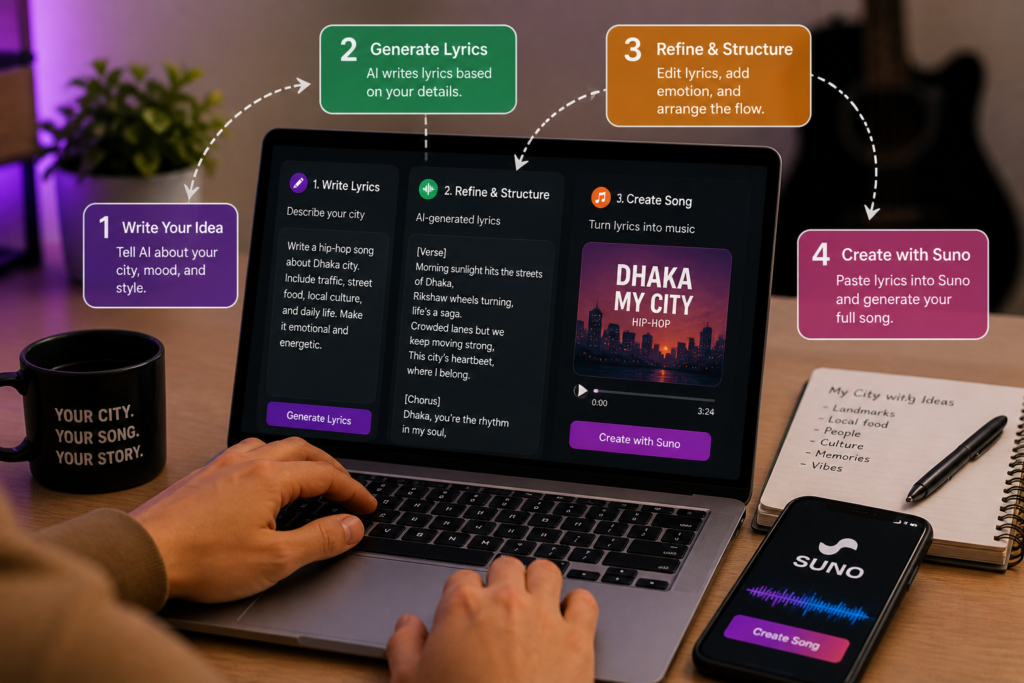
Step 6: Generate Lyrics Using Apps
Use mobile apps to generate structured lyrics:
- ChatGPT → Click here to make lyrics with chatgpt
- Google Gemini → Click here to make lyrics with gemini
Process:
| Step | Action |
|---|---|
| 1 | Copy final lyrics |
| 2 | Paste into Suno |
| 3 | Select style |
| 4 | Generate song |
Workflow Summary
| Step | Action |
|---|---|
| 1 | Define city identity |
| 2 | Choose genre |
| 3 | Add local details |
| 4 | Generate lyrics |
| 5 | Refine output |
| 6 | Structure song |
| 7 | Add emotion |
| 8 | Convert to audio |
Common Mistakes to Avoid
- Using generic prompts
- Skipping refinement
- Ignoring structure
- Not adding real details
Create Your City Song in Minutes
The process follows a clear system: define your city, generate lyrics, refine them, and convert them into a complete track.
Use these tools:
- ChatGPT → Generate lyrics
- Google Gemini → Alternative generation
- Suno → Create full song
Song Structure Reference
| Section | Primary Purpose | Recommended Length |
|---|---|---|
| Verse | Build story | 8–16 bars |
| Chorus | Main hook | 4–8 bars |
| Bridge | Contrast | 4–8 bars |
Want to make contant faces with gemini click here
Step 7: Convert Lyrics Into a Song
Input Structure Example:
Step 8: Add Emotional Depth
Improve quality by:
- Including real experiences
- Adding sensory elements (sound, smell, visuals)
- Using specific locations
Use music generation tools: Click here to make your song