Best Photo Editing android app For Beginners – Free Photo Editor
Mredul Alom
May 4, 2026
0 Comments
Best Free Photo Editing Android Apps for Beginners: Easy Photo Editor App Guide
In the digital age, photo editing has become an essential skill for many, especially for beginners looking to enhance their photography. With a plethora of free photo editing apps available on Android, it can be overwhelming to choose the right one. This guide will help you navigate through the best options, focusing on user-friendly features that cater specifically to beginners. You will learn about the top apps, their unique functionalities, and how they simplify the editing process. Additionally, we will explore the role of AI in enhancing photo editing capabilities and provide practical tips on using filters effectively. By the end of this article, you will have a clear understanding of the best free photo editing apps for Android beginners.
Which Free Photo Editor Apps Are Best for Android Beginners?
Choosing the right photo editing app can significantly impact your editing experience. For beginners, user-friendly interfaces and essential features are crucial. Here are some of the best free photo editing apps available for Android:
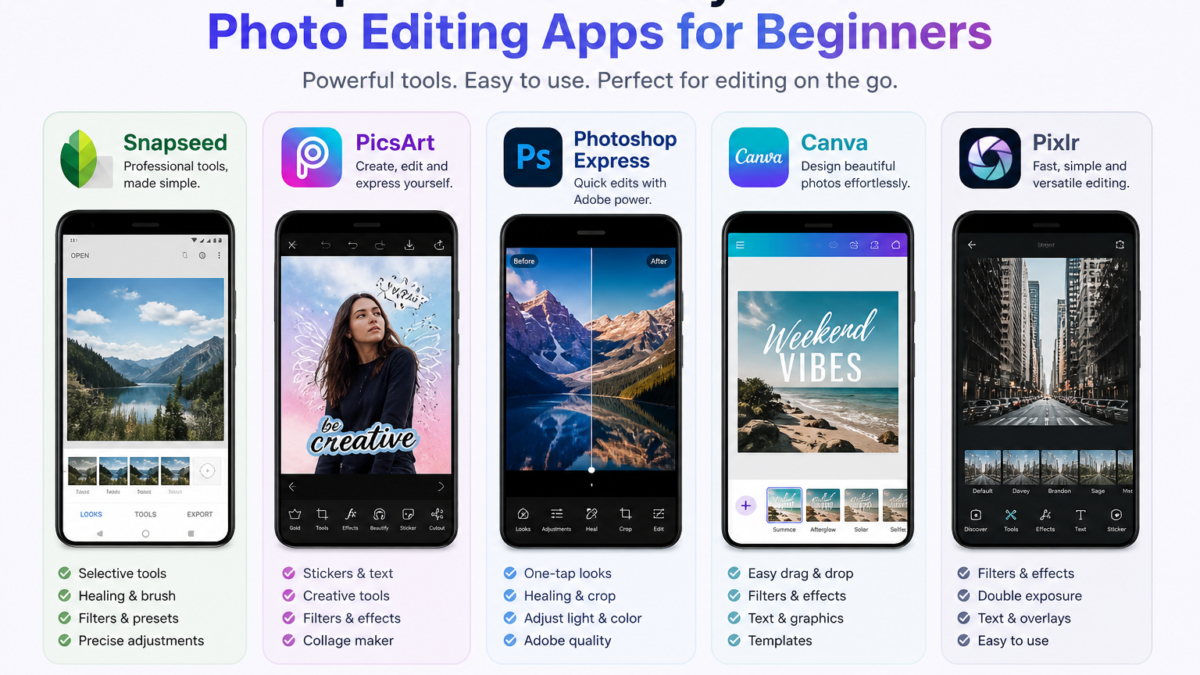
Top 5 User-Friendly Android Photo Editing Apps for Beginners
Best Photo Editing android app For Beginners – Free Photo Editor 5
Snapseed: This app offers a wide range of editing tools and filters, making it perfect for beginners. Its intuitive interface allows users to easily navigate through features like cropping, adjusting brightness, and applying filters.
PicsArt: Known for its creative tools, PicsArt combines photo editing with social networking. Beginners can enjoy features like stickers, text overlays, and a variety of filters to enhance their images.
Adobe Photoshop Express: A simplified version of the renowned Photoshop software, this app provides essential editing tools and a user-friendly interface, making it accessible for beginners.
Canva: While primarily a design tool, Canva offers excellent photo editing features. Its drag-and-drop interface allows beginners to create stunning visuals effortlessly.
Pixlr: This app provides a range of editing tools and effects, along with a simple interface that is easy to navigate for new users.
These apps have been selected based on their user ratings and the ease with which beginners can learn to use them effectively.
Research further emphasizes the importance of intuitive design in mobile photo editors for beginners, highlighting how effective user interfaces enable non-designers to create beautiful photos with ease.
User-Friendly Mobile Photo Editors for Beginners
The mobile application supports the interest of people in photography that provides features like image editing. Photo-editing apps are in great demand to produce the perfect picture. There are many mobile applications available for photo editing such as Snapseed, VSCO, and Adobe Photoshop Express that can be downloaded for free via smart phone. An effective user interface for photo-editing services helps non-designers create beautiful photos with no significant effort. The designer’s job is to organize and present all the features in that way so that everyone can do photo editing effectively and intuitively.
User Interface Design of Mobile Photo Editors, I Rochmawati, 2018
Best Photo Editing android app For Beginners – Free Photo Editor 6
How Do These Apps Simplify Photo Editing for New Users?
The best photo editing apps for beginners focus on simplicity and accessibility. They often include features such as:
Intuitive Interfaces: Most beginner-friendly apps have straightforward layouts that make navigation easy, allowing users to find tools quickly.
Tutorials and Guides: Many apps offer built-in tutorials or guides that help new users understand how to use various features effectively.
One-Tap Enhancements: Features like auto-enhance allow users to improve their photos with a single tap, making the editing process less daunting.
These elements contribute to a smoother learning curve for beginners, enabling them to create beautiful edits without feeling overwhelmed.
What AI Features Enhance Free Photo Editing Apps on Android?
Best Photo Editing android app For Beginners – Free Photo Editor 7
Artificial Intelligence (AI) is revolutionizing the way we edit photos, making it easier for beginners to achieve professional-looking results. Many free photo editing apps now incorporate AI features that enhance user experience and photo quality.
How Does AI Auto-Enhance Improve Photo Quality?
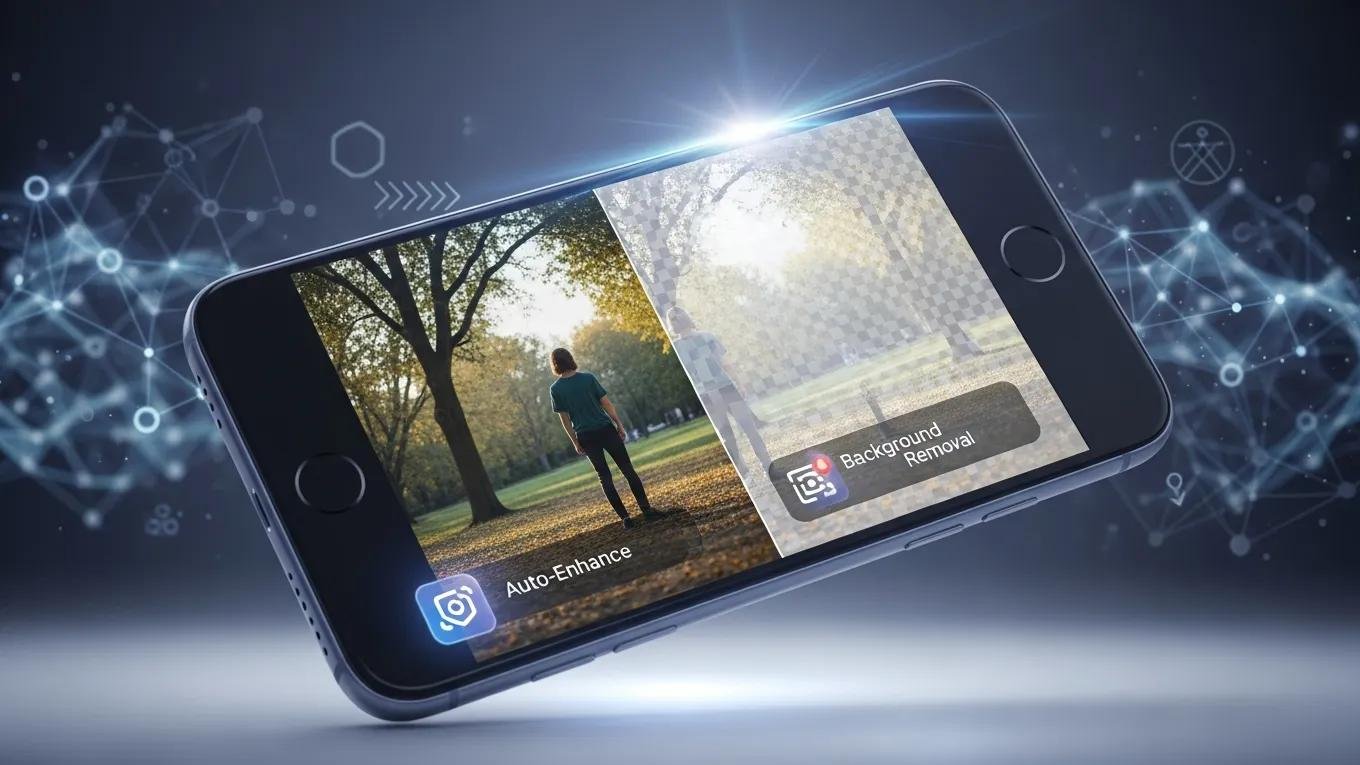
AI auto-enhance features analyze images and automatically adjust settings such as brightness, contrast, and saturation. This technology allows beginners to improve their photos without needing extensive knowledge of editing techniques. By simply tapping a button, users can achieve a polished look that would typically require more advanced skills.
What Are the Latest AI Tools Like Background Removal and Style Transfer?
Recent advancements in AI have introduced tools like background removal and style transfer. Background removal allows users to isolate subjects in their photos, making it easier to create stunning compositions. Style transfer enables users to apply artistic effects to their images, transforming them into unique works of art. These tools not only enhance creativity but also simplify complex editing tasks for beginners.
Further studies highlight how artificial intelligence is transforming photo editing, making advanced features accessible to all users through intelligent editing tools that leverage deep learning for effortless image adjustments.
AI Photo Editing for Beginners: Effortless Image Enhancement
Artificial intelligence is revolutionizing digital photo editing. This project presents an intelligent editing tool that uses deep learning to make complex image adjustments effortless. It leverages cutting-edge techniques such as convolutional neural networks (CNNs), generative adversarial networks (GANs), and image segmentation to perform tasks like removing backgrounds, enhancing faces, modifying objects, and improving image quality. Additionally, the tool can revive faded colors and apply artistic filters. Designed with user-friendliness in mind, it operates through a web platform, allowing even non-experts to achieve polished, professional looking edits. By integrating AI, this editor demonstrates how technology can streamline image enhancement, making it quicker, easier, and more intuitive for users of all skill levels.
A Web Based AI Application for Image Editing, PK Gupta, 2025
How Can Beginners Use Android Photo Filters Effectively?
Filters are a popular feature in photo editing apps, allowing users to quickly change the mood and style of their images. For beginners, understanding how to use filters effectively can elevate their photography.
Academic research underscores the significant role filters play in both enhancing photos and driving user engagement, catering to both serious and casual photographers.
Photo Filters: Enhancing Images & User Engagement
A variety of simple graphical filters are available to camera phone users to enhance their photos on the fly; these filters often stylize, saturate or age a photo. We look at producers’ practices of photo filtering and gain insights in the roles filters play in engaging photo consumers’ by driving their social interactions. We find two groups of serious and casual photographers among filter users. The serious see filters as correction tools and prefer milder effects. Casual photographers, by contrast, use filters to significantly transform their photos with bolder effects.
Why we filter our photos and how it impacts engagement, S Bakhshi, 2015
Which Android Photo Filters Are Best for Easy Editing?
Some of the best filters for beginners include:
Vintage: Adds a nostalgic feel to photos, perfect for portraits and landscapes.
Black and White: Great for creating dramatic effects and emphasizing textures.
Vibrant: Enhances colors, making images pop and appear more lively.
These filters are easy to apply and can significantly improve the overall aesthetic of photos.
Step-by-Step Guide to Applying Filters for Beginners
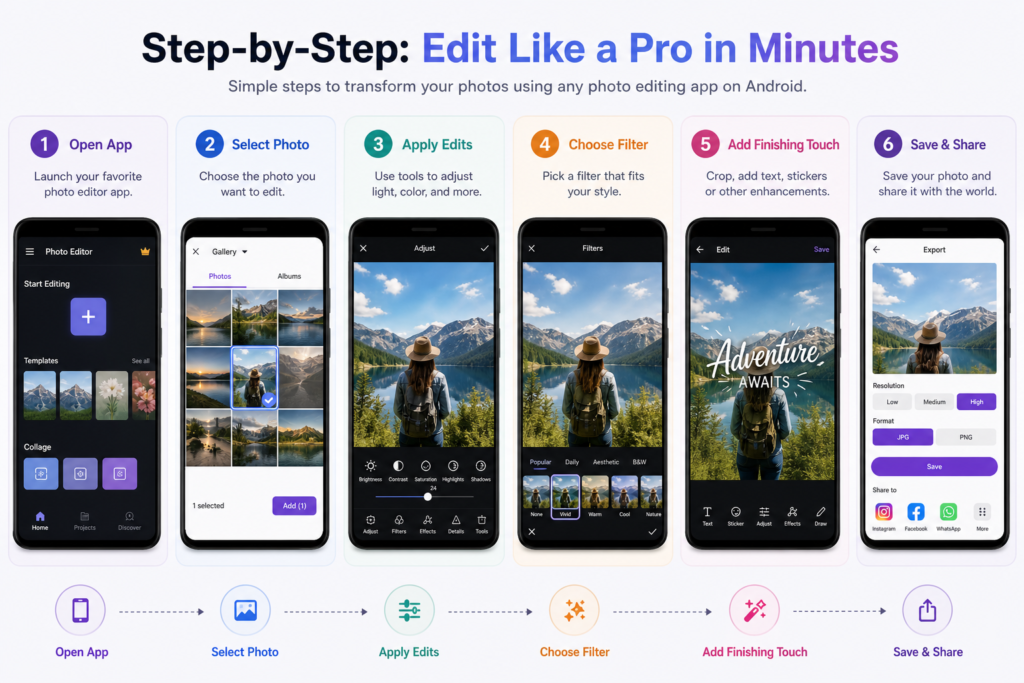
Applying filters is a straightforward process. Here’s a simple guide for beginners:
Open the App: Launch your chosen photo editing app and select the image you want to edit.
Select Filters: Navigate to the filters section and browse through the available options.
Preview and Apply: Tap on a filter to preview its effect on your photo. If you like it, apply the filter.
Adjust Intensity: Many apps allow you to adjust the intensity of the filter. Experiment with this to find the perfect balance.
Save Your Edit: Once satisfied, save your edited photo to your device.
This step-by-step approach ensures that beginners can easily enhance their photos using filters.
What Are the Advantages of Free vs Paid Photo Editing Apps for Beginners?
When starting with photo editing, many beginners wonder whether to use free or paid apps. Each option has its advantages and disadvantages.
Which Features Are Available in Free Android Photo Editors?
Free photo editing apps typically offer a range of essential features, including:
For those interested in exploring advanced camera applications that leverage AI technology, check out this comprehensive guide on the Best Camera App with AI Features. This resource provides expert insights into top Android camera apps that enhance photography through artificial intelligence, helping users capture and edit stunning photos effortlessly.